


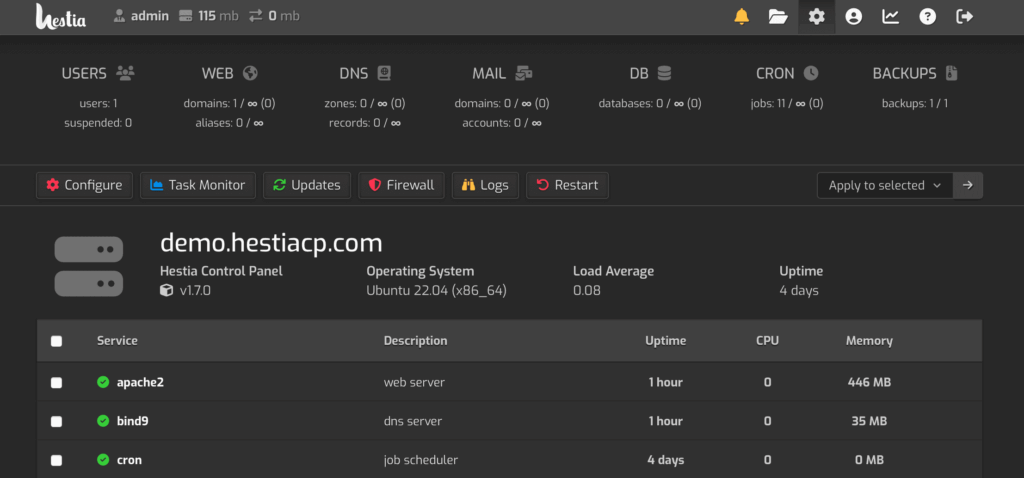
Managing web servers has become significantly easier with open source web hosting control panels. These powerful tools provide intuitive graphical interfaces that simplify complex server management tasks, making them accessible to both beginners and experienced administrators. Open source web hosting control panels offer cost-effective alternatives to commercial solutions while providing robust features for website management, email configuration, database administration, and security management.
The demand for reliable web hosting control panels continues to grow as more businesses and individuals seek affordable yet powerful solutions for managing their online presence. Open source options stand out by offering transparency, community support, and the freedom to customize according to specific needs. Whether you’re managing a single website or multiple domains across various servers, choosing the right control panel can significantly impact your workflow efficiency and server performance.
This comprehensive guide explores the 13 best open source web hosting control panels available in 2026, examining their unique features, advantages, and potential drawbacks to help you make an informed decision for your hosting infrastructure.
What is hosting control panels in web hosting?
A hosting control panel is a web-based graphical user interface (GUI) that simplifies the management and administration of web hosting servers. It provides an intuitive dashboard that allows users to perform complex server management tasks without requiring extensive technical knowledge or command-line expertise.
Hosting control panels bridge the gap between the technical complexity of server administration and user-friendly accessibility. Instead of manually configuring server settings through SSH commands and editing configuration files, users can manage their hosting environment through a visual interface with point-and-click simplicity.
Key Functions of Web Hosting Control Panels
1. Website Management
- Create and manage multiple websites and domains
- Configure subdomains and addon domains
- Upload and organize website files through file managers
- Set up redirects and URL forwarding
- Manage DNS records for domain configuration
2. Email Administration
- Create and manage email accounts
- Configure email forwarding and autoresponders
- Set up spam filters and virus protection
- Access webmail interfaces
- Manage email quotas and aliases
3. Database Management
- Create and configure databases (MySQL, PostgreSQL)
- Access database management tools (phpMyAdmin)
- Manage database users and permissions
- Perform backups and restorations
- Monitor database performance
4. Security Features
- Install and manage SSL/TLS certificates
- Configure firewall rules
- Set up password-protected directories
- Monitor security logs and alerts
- Manage IP blocking and access controls
5. File Management
- Upload, download, and organize files
- Create and manage FTP accounts
- Edit files directly in the browser
- Set file permissions
- Compress and extract archives
6. Backup and Recovery
- Schedule automated backups
- Create manual backups on-demand
- Restore websites and databases
- Download backup files
- Configure remote backup storage
7. Resource Monitoring
- Track bandwidth usage
- Monitor disk space consumption
- View CPU and memory utilization
- Analyze traffic statistics
- Generate usage reports
Types of Hosting Control Panels
Commercial Control Panels
- cPanel/WHM: The industry-standard commercial solution
- Plesk: Popular cross-platform alternative
- DirectAdmin: Lightweight commercial option
Open Source Control Panels
- HestiaCP: Modern, lightweight solution
- CyberPanel: OpenLiteSpeed-powered panel
- Virtualmin: Comprehensive open source option
- ISPConfig: Multi-server management solution
Best 13 Open Source Web Hosting Control Panels 2026
In this article you can find out the best Open Source Web Hosting Control Panels list are below;
1. HestiaCP
HestiaCP represents a modern evolution in open source web hosting control panels, forked from VestaCP to continue its legacy with active development and enhanced security features. This lightweight yet powerful control panel delivers an intuitive interface that simplifies server management tasks while maintaining excellent performance even on resource-constrained systems.
The platform excels in providing a clean, user-friendly dashboard that allows administrators to manage websites, databases, email accounts, and DNS records effortlessly. HestiaCP supports multiple PHP versions, enabling developers to run different applications with their specific requirements on the same server. The control panel integrates seamlessly with popular web servers including Nginx, Apache, and their combination, offering flexibility in server configuration.
Security remains a top priority for HestiaCP, with built-in features like fail2ban integration, automatic SSL certificate management through Let’s Encrypt, and regular security updates. The system includes comprehensive backup functionality, allowing automated scheduled backups to local storage or remote locations. HestiaCP’s architecture ensures minimal resource consumption while delivering maximum functionality, making it an excellent choice for VPS and dedicated server environments.
The active community surrounding HestiaCP contributes to its continuous improvement, with regular updates addressing bugs and introducing new features. The control panel’s straightforward installation process and extensive documentation make it accessible to users with varying technical expertise levels.
Key Features
- Multi-PHP version support with easy switching
- Integrated Let’s Encrypt SSL automation
- Built-in firewall management and fail2ban
- Comprehensive backup and restoration system
- Support for Nginx, Apache, and combined configurations
- One-click application installer
- File manager with editing capabilities
- Email server management with spam protection
Pros
- Lightweight and resource-efficient design
- Active development and regular updates
- Clean, modern interface with excellent usability
- Strong security features out of the box
- Free and completely open source
- Extensive documentation and helpful community
- Easy migration from VestaCP
Cons
- Smaller plugin ecosystem compared to cPanel
- Limited third-party integration options
- Fewer advanced features for enterprise environments
- Learning curve for users switching from other panels
2. aaPanel
aaPanel emerges as one of the most user-friendly open source web hosting control panels, designed specifically to simplify server management for users who may lack extensive technical expertise. This Chinese-developed control panel has gained international popularity due to its intuitive interface and comprehensive feature set that rivals many commercial alternatives.
The platform offers one-click installation for popular applications and services, dramatically reducing the time required to deploy new websites and applications. aaPanel supports both LAMP (Linux, Apache, MySQL, PHP) and LNMP (Linux, Nginx, MySQL, PHP) stacks, giving administrators flexibility in choosing their preferred technology stack. The control panel includes an integrated application store where users can install additional software modules, databases, and development tools with minimal effort.
aaPanel’s monitoring capabilities provide real-time insights into server performance, including CPU usage, memory consumption, disk space, and network activity. The panel features robust security management tools, including firewall configuration, SSL certificate installation, and access control settings. Database management becomes straightforward through the integrated phpMyAdmin interface, while the file manager allows direct manipulation of server files through the browser.
The platform’s backup system enables automated scheduling with support for various storage destinations, including cloud services like Amazon S3 and Google Drive. aaPanel’s approach to software management through package repositories ensures that installed applications remain up-to-date with the latest security patches and feature enhancements.
Key Features
- One-click application and service installation
- Real-time server resource monitoring
- Integrated software store with extensive options
- Support for multiple PHP versions and configurations
- Built-in WAF (Web Application Firewall)
- Automated backup to cloud storage providers
- SSL certificate management with Let’s Encrypt
- Docker container support
Pros
- Extremely user-friendly interface design
- Comprehensive monitoring and analytics
- Regular updates and active development
- Free version with substantial functionality
- Excellent documentation with video tutorials
- Strong community support
- Multi-language support including English
Cons
- Some features require premium subscription
- Originally designed for Chinese market (translation issues occasionally)
- Limited customization options in free version
- Resource usage higher than minimal panels
3. CyberPanel
CyberPanel distinguishes itself as the first open source web hosting control panel powered by OpenLiteSpeed, delivering exceptional performance and speed advantages over traditional Apache-based solutions. This innovative control panel combines enterprise-grade features with an accessible interface, making high-performance web hosting available to everyone without licensing costs.
The integration with OpenLiteSpeed web server provides built-in caching capabilities that dramatically accelerate website loading times, often matching or exceeding the performance of commercial LiteSpeed Enterprise server. CyberPanel supports LSCache, a powerful caching solution that works seamlessly with popular CMS platforms like WordPress, Joomla, and PrestaShop. The panel includes native support for HTTP/3 and QUIC protocol, ensuring websites remain at the forefront of web technology standards.
Email server management receives particular attention in CyberPanel, with integrated support for multiple email protocols, spam filtering, and calendar functionality. The control panel features an intuitive website management interface that allows creation and configuration of unlimited websites, each with independent PHP version selection and resource allocation. CyberPanel’s Git integration enables developers to deploy applications directly from repositories, streamlining the development workflow.
Security features include automatic SSL certificate installation, firewall management through CSF (ConfigServer Security & Firewall), and ModSecurity integration for web application protection. The platform supports Docker containers, allowing advanced users to deploy containerized applications alongside traditional websites on the same server infrastructure.
Key Features
- OpenLiteSpeed web server with built-in caching
- HTTP/3 and QUIC protocol support
- LSCache integration for major CMS platforms
- Native Git deployment capabilities
- Email server with calendar and contact management
- Multi-PHP version support per website
- ModSecurity and CSF firewall integration
- Docker container management
Pros
- Exceptional website performance and speed
- Completely free with no premium tiers
- Modern interface with excellent usability
- Strong security features included
- Active development and community
- Excellent WordPress optimization
- Regular updates and improvements
Cons
- OpenLiteSpeed compatibility issues with some applications
- Steeper learning curve than simpler panels
- Requires more server resources than minimal panels
- Limited control panel extensions available
4. Control Web Panel (CWP)
Control Web Panel, commonly known as CWP, represents one of the most feature-rich open source web hosting control panels available, offering functionality that rivals commercial alternatives at no cost. This comprehensive solution caters particularly well to hosting providers and administrators managing multiple client accounts on shared hosting environments.
CWP provides two distinct interface levels: an admin panel for root-level server management and a user panel for individual account holders. This separation ensures appropriate access controls while maintaining ease of use across different user types. The control panel supports automatic installation of numerous web applications through Softaculous integration, enabling users to deploy popular CMS platforms, forums, and e-commerce solutions with minimal effort.
The platform’s server management capabilities include detailed monitoring tools that track resource usage, security events, and system performance metrics. CWP features integrated backup solutions with multiple storage options, including local, FTP, and cloud-based destinations. The control panel’s security framework incorporates CSF firewall, ModSecurity rules, and malware scanning capabilities to protect hosted websites from various threats.
CWP distinguishes itself through extensive customization options, allowing administrators to modify nearly every aspect of the control panel’s appearance and functionality. The system supports both Nginx and Varnish as reverse proxies in front of Apache, optimizing server performance for high-traffic websites. Database management tools provide comprehensive interfaces for MySQL and PostgreSQL administration, while the DNS management system supports clustering for enhanced reliability.
Key Features
- Dual interface system (admin and user panels)
- Softaculous auto-installer with 400+ applications
- CSF firewall and ModSecurity integration
- Multiple web server configurations (Apache, Nginx, Varnish)
- Advanced backup and restoration system
- File manager with compression and extraction
- SQL and PostgreSQL database management
- Free and Pro versions available
Pros
- Extensive feature set comparable to cPanel
- Strong security features and monitoring
- Excellent for hosting providers
- Active community forum
- Regular security updates
- Supports reseller accounts
- Migration tools from other panels
Cons
- Interface appears dated compared to modern panels
- Resource-intensive on smaller VPS instances
- Pro version required for some advanced features
- Documentation could be more comprehensive
- Occasional stability issues reported
5. Virtualmin/Webmin
Virtualmin, built upon the robust Webmin framework, delivers professional-grade server management capabilities through open source web hosting control panels that have served the Linux community for over two decades. This mature solution combines the powerful system administration features of Webmin with the web hosting-specific functionality of Virtualmin, creating a comprehensive management environment.
Webmin serves as the foundation, providing low-level system configuration tools for nearly every aspect of Linux server management, from user accounts and disk quotas to kernel parameters and system services. Virtualmin extends these capabilities with hosting-specific features, including domain management, email configuration, database administration, and website deployment tools. The modular architecture allows administrators to enable only the features they need, maintaining system efficiency.
The control panel excels in flexibility, supporting multiple Linux distributions including Ubuntu, Debian, CentOS, and Rocky Linux. Virtualmin’s virtual server concept enables clean separation between different hosting accounts, with each virtual server functioning independently with its own resources, users, and configurations. This approach proves particularly valuable for hosting providers managing multiple clients or organizations running numerous distinct web properties.
Virtualmin’s command-line interface provides advanced users with powerful scripting capabilities for automation and bulk operations. The platform supports both GPL (free) and Professional (paid) versions, with the open source GPL edition providing substantial functionality for most use cases. Integration with industry-standard components like Postfix, Dovecot, SpamAssassin, and ClamAV ensures reliable email services with robust spam and virus protection.
Key Features
- Complete system administration through Webmin
- Virtual server isolation for multiple domains
- Support for numerous Linux distributions
- Command-line interface for automation
- Comprehensive email server management
- Database management for MySQL and PostgreSQL
- SSL certificate installation and management
- Extensive module system for added functionality
Pros
- Mature, stable platform with long development history
- Extremely powerful and flexible configuration options
- Strong community and extensive documentation
- Free GPL version with substantial features
- Excellent for advanced users and system administrators
- Regular updates and security patches
- Multi-server management capabilities
Cons
- Interface feels outdated and less intuitive
- Steeper learning curve for beginners
- Configuration can be complex for simple tasks
- Resource consumption higher than lightweight alternatives
- Some advanced features require Professional version
6. ISPConfig
ISPConfig stands as a robust open source web hosting control panel specifically engineered for hosting providers and enterprises requiring multi-server management capabilities. This German-developed solution emphasizes security, stability, and scalability, making it ideal for organizations managing complex hosting infrastructures across distributed server environments.
The control panel’s architecture supports managing multiple servers from a single interface, with automatic synchronization of configurations, user accounts, and hosting settings across the entire infrastructure. ISPConfig implements a client-reseller-admin hierarchy, enabling hosting providers to create reseller accounts who can then manage their own client base independently. This multi-tiered approach facilitates business models common in the hosting industry.
ISPConfig provides comprehensive support for web, email, database, and DNS services, with each component highly configurable to meet specific requirements. The platform integrates seamlessly with popular open source technologies including Apache, Nginx, Postfix, Dovecot, and PowerDNS. Security features encompass fail2ban integration, jailkit for account isolation, and comprehensive logging facilities for audit trails and troubleshooting.
The control panel’s update mechanism ensures smooth upgrades with automatic database migrations and configuration file updates, minimizing downtime during maintenance windows. ISPConfig’s templating system allows administrators to create standardized configurations for common hosting scenarios, streamlining the process of setting up new client accounts. The platform provides both English and German interfaces with active communities supporting both languages.
Key Features
- Multi-server management from single interface
- Client-reseller-admin hierarchy system
- Support for Apache and Nginx web servers
- Integrated email server with spam filtering
- DNS server management with clustering support
- Jailkit for enhanced security isolation
- Quota management and resource limits
- Migration tools from other control panels
Pros
- Excellent for multi-server environments
- Strong security and isolation features
- Perfect for hosting providers
- Active development and updates
- Comprehensive documentation
- Free and open source with no limitations
- Supports major Linux distributions
Cons
- Interface not as modern as newer panels
- Initial setup requires technical knowledge
- Limited one-click application installers
- Smaller community compared to mainstream panels
- Learning curve for complex configurations
7. Froxlor
Froxlor represents a lightweight yet capable open source web hosting control panel that prioritizes simplicity and efficiency without sacrificing essential functionality. This German-developed solution focuses on providing core hosting management features with minimal resource overhead, making it particularly suitable for smaller VPS instances and resource-conscious environments.
The control panel’s design philosophy emphasizes clean code, straightforward configuration, and efficient operation. Froxlor supports essential web hosting functions including domain management, FTP account creation, database administration, and email configuration. The platform integrates with standard Linux components like Apache, Nginx, Postfix, and Dovecot, ensuring compatibility with industry-standard practices and configurations.
Froxlor implements a clear separation between administrative and customer interfaces, with administrators maintaining full control over system settings while customers access only their specific hosting accounts. The panel includes comprehensive logging capabilities that track all configuration changes and system events, supporting troubleshooting and security auditing requirements. Resource limit enforcement ensures fair distribution of server resources among multiple hosting accounts.
The control panel’s API enables custom integration with external systems, allowing hosting providers to connect Froxlor with billing platforms, monitoring tools, and custom management applications. Froxlor’s update mechanism provides straightforward version upgrades with clear documentation of changes and new features in each release. The active development team maintains regular release cycles, addressing security vulnerabilities promptly and gradually expanding the feature set based on community feedback.
Key Features
- Lightweight resource footprint
- Admin and customer interface separation
- Support for Apache and Nginx configurations
- FTP, email, and database management
- Let’s Encrypt SSL integration
- Comprehensive logging system
- API for external integrations
- Traffic and resource usage statistics
Pros
- Very low resource consumption
- Clean, efficient codebase
- Regular updates and security patches
- Free and open source
- Good documentation
- Suitable for small to medium deployments
- Fast and responsive interface
Cons
- Limited advanced features
- Smaller feature set than comprehensive panels
- Fewer third-party integrations
- Community smaller than major alternatives
- Interface design quite basic
- No application auto-installer
- Limited multi-server capabilities
8. VestaCP
VestaCP established itself as a popular open source web hosting control panel known for its elegant design and straightforward functionality, though its development has slowed in recent years with the community forking it into HestiaCP for continued evolution. Despite reduced official development, VestaCP remains deployed on thousands of servers worldwide due to its proven stability and efficient operation.
The control panel delivers a clean, modern interface that simplifies complex server management tasks into intuitive workflows accessible to users with varying technical expertise. VestaCP supports multiple web servers including Nginx as a standalone option or as a reverse proxy in front of Apache, optimizing performance based on specific use cases. The platform includes integrated database management for MySQL and PostgreSQL, with phpMyAdmin and phpPgAdmin providing familiar interfaces for database operations.
VestaCP’s backup system implements incremental backups to minimize storage requirements while ensuring rapid restoration capabilities when needed. The control panel includes comprehensive email server management with support for multiple domains, spam filtering through SpamAssassin, and antivirus protection via ClamAV. Security features encompass fail2ban integration for brute-force protection and automated SSL certificate installation through Let’s Encrypt.
The platform’s package system allows administrators to create templates defining resource limits, available features, and default settings for different account types. This functionality proves particularly useful for hosting providers offering tiered service plans. VestaCP’s installation script provides quick deployment on fresh server instances, with the entire setup typically completing within minutes on modern hardware.
Key Features
- Clean, intuitive user interface
- Nginx standalone or as reverse proxy
- Incremental backup system
- Multiple database support (MySQL, PostgreSQL)
- Email server with spam and virus protection
- Let’s Encrypt SSL automation
- Fail2ban integration for security
- Package templates for hosting plans
Pros
- Elegant, modern interface design
- Low resource consumption
- Stable and proven platform
- Easy installation process
- Comprehensive documentation
- Free and open source
- Good performance optimization
Cons
- Development has largely ceased
- No major updates in recent years
- Limited community support now
- Security updates becoming less frequent
- Better to choose HestiaCP for continued development
- Fewer features than actively developed alternatives
- Migration to HestiaCP recommended
9. ISPmanager
ISPmanager presents a commercial-grade open source web hosting control panel that balances powerful functionality with user-friendly operation, serving both individual server administrators and large hosting providers. This Russian-developed solution has earned recognition for its polished interface and comprehensive feature set that addresses diverse hosting management scenarios.
The control panel offers multiple editions tailored to different use cases, from single-server deployments to large-scale hosting operations managing thousands of client accounts. ISPmanager implements role-based access control, enabling administrators to define granular permissions for different user types and ensuring appropriate access levels throughout the organization. The platform supports both physical and virtual server environments, including compatibility with popular virtualization technologies.
ISPmanager’s website management capabilities include support for multiple web servers, with Apache and Nginx configuration options available to optimize performance based on application requirements. The control panel integrates with popular CMS platforms through application installers, simplifying website deployment for end users. Database management tools provide comprehensive interfaces for MySQL and PostgreSQL administration, including backup scheduling and query execution capabilities.
The platform’s monitoring system delivers real-time visibility into server health, resource utilization, and service availability, with alert mechanisms notifying administrators of potential issues before they impact users. ISPmanager includes sophisticated backup functionality supporting various storage destinations and retention policies. The control panel’s API facilitates integration with external systems, including billing platforms, monitoring tools, and custom management applications.
Key Features
- Multiple editions for different scales
- Role-based access control system
- Support for Apache and Nginx
- Application installer integration
- Real-time server monitoring
- Advanced backup and restoration
- API for external integrations
- Multi-language interface support
Pros
- Professional, polished interface
- Comprehensive feature set
- Excellent documentation
- Strong customer support (paid editions)
- Regular updates and improvements
- Suitable for enterprise environments
- Good performance and stability
Cons
- Not entirely free (lite version limited)
- More expensive than other open source options
- Complexity may overwhelm beginners
- Primarily focused on Russian market
- Larger resource footprint than minimal panels
- Some features restricted to higher tiers
10. RunCloud
RunCloud approaches web hosting control panels from a cloud-native perspective, delivering a modern SaaS-based solution that manages servers without requiring traditional control panel installation on the target systems. This innovative approach separates the control interface from managed servers, providing greater flexibility and reduced resource consumption on hosting infrastructure.
The platform connects to servers via secure SSH connections, installing minimal agent software that enables RunCloud to configure and manage server components remotely. This architecture allows administrators to manage multiple servers across different providers from a unified interface, streamlining operations for organizations with distributed infrastructure. RunCloud supports major cloud providers including DigitalOcean, AWS, Google Cloud, and Linode, as well as any custom VPS or dedicated server.
RunCloud emphasizes performance optimization through built-in support for multiple PHP versions, Redis caching, and database query caching. The platform includes native Git deployment capabilities, enabling developers to push code changes directly from repositories to production servers. SSL certificate management through Let’s Encrypt happens automatically, with RunCloud handling renewal processes transparently.
The control panel’s security features include automatic security updates, firewall management, and malware scanning capabilities. RunCloud provides comprehensive staging environment support, allowing developers to test changes in isolated environments before promoting them to production. The platform’s collaboration features enable team members to access shared servers with appropriate permission levels, facilitating DevOps workflows.
Key Features
- Cloud-based SaaS control panel
- Multi-server management interface
- Native Git deployment integration
- Multiple PHP version support
- Redis and database caching
- Automated SSL certificate management
- Staging environment capabilities
- Team collaboration features
Pros
- Modern, intuitive web interface
- No resource consumption on managed servers
- Excellent for managing multiple cloud servers
- Strong focus on performance optimization
- Good Git integration for developers
- Regular updates and new features
- Comprehensive documentation
Cons
- Not open source (SaaS model)
- Requires subscription fee
- Dependent on RunCloud service availability
- Limited customization compared to self-hosted panels
- Free tier has significant limitations
- May not suit all use cases
- Additional costs for more servers
11. Sentora
Sentora emerged as a community-driven continuation of the ZPanel project, aiming to provide a free, open source web hosting control panel accessible to users worldwide. This lightweight solution focuses on delivering essential hosting management functionality through a straightforward interface that prioritizes usability over complexity.
The control panel implements a modular architecture allowing administrators to enable or disable specific features based on their requirements, maintaining system efficiency by avoiding unnecessary components. Sentora supports fundamental web hosting operations including domain management, email account creation, FTP access configuration, and database administration. The platform integrates with Apache web server and MySQL database, representing the traditional LAMP stack familiar to many administrators.
Sentora’s design emphasizes simplicity in both installation and operation, with installation scripts automating the deployment process on supported Linux distributions. The control panel includes basic security features such as password-protected directories, IP blocking capabilities, and backup functionality for protecting hosted content. Module developers within the Sentora community contribute extensions that expand the platform’s capabilities beyond core functionality.
The platform provides separate interfaces for administrators and end users, with administrators accessing comprehensive server configuration options while end users focus on managing their specific hosting accounts. Sentora’s dashboard presents key statistics and quick access links to common tasks, streamlining routine operations for both user types.
Key Features
- Modular architecture for flexibility
- Apache and MySQL integration
- Domain and subdomain management
- Email account configuration
- FTP access management
- MySQL database administration
- File manager with basic operations
- Module system for extensions
Pros
- Completely free and open source
- Lightweight resource requirements
- Easy installation process
- Simple, straightforward interface
- Active community forum
- Suitable for learning and small projects
- Regular security updates
Cons
- Development pace has slowed
- Limited advanced features
- Fewer integrations than major panels
- Basic interface design
- Smaller feature set overall
- Community smaller than alternatives
- Less suitable for production hosting businesses
12. Kloxo
Kloxo, also known as Kloxo-MR (Master Release) in its community-maintained version, represents an open source web hosting control panel that aims to provide comprehensive functionality for managing Linux servers. The project has experienced periods of dormant development followed by community revivals, resulting in various forks with different feature sets and stability levels.
The control panel offers extensive configuration options for web servers, supporting both Apache and Lighttpd with the ability to use Nginx as a reverse proxy for performance optimization. Kloxo provides management interfaces for email servers, DNS configuration, database administration, and file management. The platform includes support for multiple PHP versions, enabling administrators to run different applications with their specific runtime requirements on the same server.
Kloxo’s backup system implements automated scheduling with support for full and incremental backup modes, helping protect hosted content against data loss scenarios. The control panel includes basic security features such as SSL certificate installation, though administrators typically supplement these with additional hardening measures. Kloxo’s templating system allows definition of hosting packages with specific resource limits and feature sets, useful for hosting providers offering tiered services.
The platform’s community-maintained nature means feature development and bug fixes depend on volunteer contributors’ availability and priorities. Different Kloxo variants exist, each with unique characteristics and maintenance statuses, requiring careful evaluation before deployment in production environments.
Key Features
- Support for Apache and Lighttpd
- Nginx reverse proxy capability
- Multiple PHP version management
- Email and DNS server configuration
- Database administration tools
- Automated backup scheduling
- Hosting package templates
- Multi-server capabilities (in some versions)
Pros
- Free and open source
- Extensive configuration options
- Multiple web server choices
- Community-driven development
- Feature-rich for its resource footprint
- Supports various Linux distributions
Cons
- Inconsistent development activity
- Multiple forks create confusion
- Stability issues reported in some versions
- Security concerns with outdated releases
- Limited official support
- Documentation scattered across versions
- Interface outdated compared to modern panels
- Not recommended for critical production use
13. BlueOnyx
BlueOnyx continues the legacy of the BlueQuartz and Cobalt RaQ server appliances, adapting their commercial-grade control panel functionality for modern open source environments. This enterprise-focused solution emphasizes stability, security, and comprehensive feature sets suitable for business-critical hosting environments and professional service providers.
The control panel implements a role-based administration model with distinct interfaces for server administrators, site administrators, and end users, ensuring appropriate access levels throughout the organization. BlueOnyx provides comprehensive management capabilities for web services, email systems, DNS configuration, and database operations. The platform integrates with industry-standard components including Apache, Postfix, Dovecot, and BIND, ensuring compatibility with established best practices.
BlueOnyx’s security framework incorporates multiple layers of protection including firewall management, intrusion detection, and comprehensive logging for audit trails. The control panel includes sophisticated backup and restoration capabilities with support for scheduled operations and various storage destinations. Virtual site functionality enables isolation between different hosted domains, with each site operating independently with dedicated resources and configurations.
The platform’s monitoring system provides detailed visibility into server performance, service status, and resource utilization, with graphical representations of trends over time. BlueOnyx supports both English and Japanese interfaces, reflecting its international user base. The active development team maintains regular update cycles addressing security vulnerabilities and gradually expanding functionality based on enterprise requirements.
Key Features
- Role-based administration hierarchy
- Virtual site isolation system
- Comprehensive email server management
- DNS and DHCP server integration
- Advanced backup and restoration
- Detailed monitoring and reporting
- SSL certificate management
- Multi-language support
Pros
- Enterprise-grade stability and features
- Strong security implementation
- Professional administration interface
- Active development community
- Excellent for business environments
- Comprehensive documentation
- Long-term support commitment
Cons
- Steeper learning curve
- More complex than simpler alternatives
- Resource requirements higher than minimal panels
- Smaller community than mainstream options
- Limited third-party integrations
- Interface design somewhat dated
- Installation more involved than competitors
Conclusion
Selecting the appropriate open source web hosting control panel significantly impacts server management efficiency, website performance, and overall operational success. The 13 solutions examined in this comprehensive guide represent the best options available in 2025, each offering unique advantages for different use cases and requirements.
For users prioritizing modern interfaces and active development, HestiaCP and CyberPanel stand out as excellent choices with strong community support and regular updates. These platforms provide contemporary features while maintaining the cost advantages of open source software. Organizations requiring multi-server management capabilities should consider ISPConfig or Virtualmin/Webmin, which excel in distributed environments and complex hosting infrastructures.
Hosting providers seeking feature-rich solutions with reseller capabilities will find Control Web Panel (CWP) and ISPConfig particularly suitable, offering comprehensive client management tools and billing integration options. Developers preferring lightweight solutions with minimal resource overhead should explore Froxlor or Sentora, which deliver essential functionality without unnecessary complexity.
The landscape of open source web hosting control panels continues evolving, with new features, security enhancements, and performance optimizations appearing regularly. When evaluating these solutions, consider factors beyond immediate feature lists, including community activity, update frequency, security track records, and alignment with your specific technical requirements and expertise levels.
Most importantly, remember that the “best” control panel depends entirely on your unique circumstances, including server specifications, technical expertise, hosting requirements, and future scalability needs. Many of these platforms offer live demos or trial installations, enabling hands-on evaluation before committing to production deployment. Taking time to thoroughly test shortlisted options ensures you select a control panel that will serve your needs reliably for years to come.
The open source nature of these web hosting control panels provides transparency, flexibility, and cost savings that commercial alternatives cannot match. Whether managing a personal blog or operating a professional hosting business, the solutions presented in this guide offer powerful, reliable, and cost-effective pathways to successful server management in 2025 and beyond.