
“Can I convert WMA to MP3 without disrupting the quality of the audio file? Can a file converter do the job quickly? How can I apply the method?”
The WMA or Windows Media Audio is the default audio extension for Windows operating system. It also means that you wouldn’t be able to play the file extension on the majority of OS other than Windows.
Such an inability to play the audio doesn’t only occur due to proprietary reasons but incompatibility issues as well. It is why users prefer the more attuned MP3 format over any other file type. It will prompt the users to change WMA to MP3 whenever they are unable to access it.
You can perform the exact procedure in three ways. All you have to do is read this guide, and you will become an expert in no time!
- Part 1. Audio Converter – Convert WMA to MP3 with a Media Player
- Part 2. Audio Converter – The Most Reliable Way to Convert WMA to MP3
- Part 3. Audio Converter – Convert WMA to MP3 Online
- Conclusion
Part 1. Audio Converter – Convert WMA to MP3 with a Media Player:
You can use third-party media players from your system to change the file extension of any audio file. The VLC is arguably one of the most popular media players on the market. It is also capable of converting and editing multimedia files for its users.
In this section, we will show you how to convert WMA to MP3 with the VLC player. The steps are as follow:
- Open the VLC player on your computer;
- Click on Media from the toolbar and then hit the Convert/Save option from the drop-down menu;
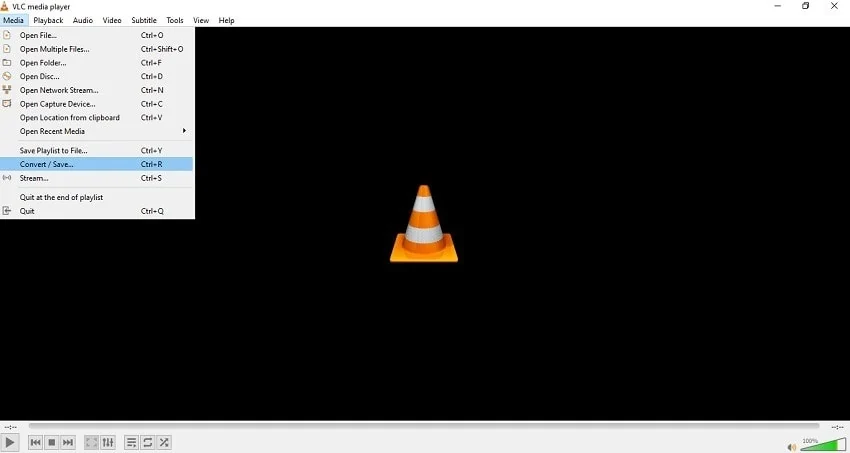
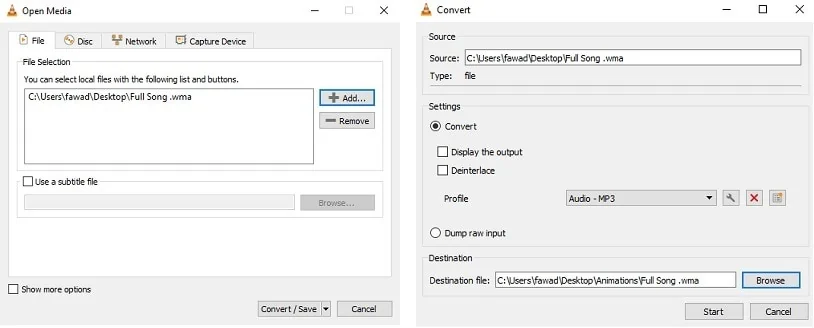
- Click on the Add button to import the WMA audio file and press Convert/Save;
- Select the new location for the MP3 file and click on Start to initiate the conversion process;
Most media players are well-equipped to convert the file formats of audios and videos whenever necessary. However, it is not their primary job, and a minor misstep could ruin the composition of the file. It is why we do not recommend using this method to convert WMA to MP3.
Part 2. Audio Converter – The Most Reliable Way to Convert WMA to MP3
As discussed earlier, using a third-party media player to convert audio file types could cause more harm than good. For that, you can learn the method to use the most reliable technique to convert WMA to MP3.
The way is using the UniConverter Audio Converter by Wondershare. The tool is reliable, user-friendly, and incredibly fast. It outperforms other average conversion tools with a 30x speedier rendering rate. Moreover, it supports over 1000 audio and video file types, including WMA and MP3. Additionally, the latest version 12 of the UniConverter is available with full features on both Windows and macOS.
Here are the instructions to convert WMA to MP3:
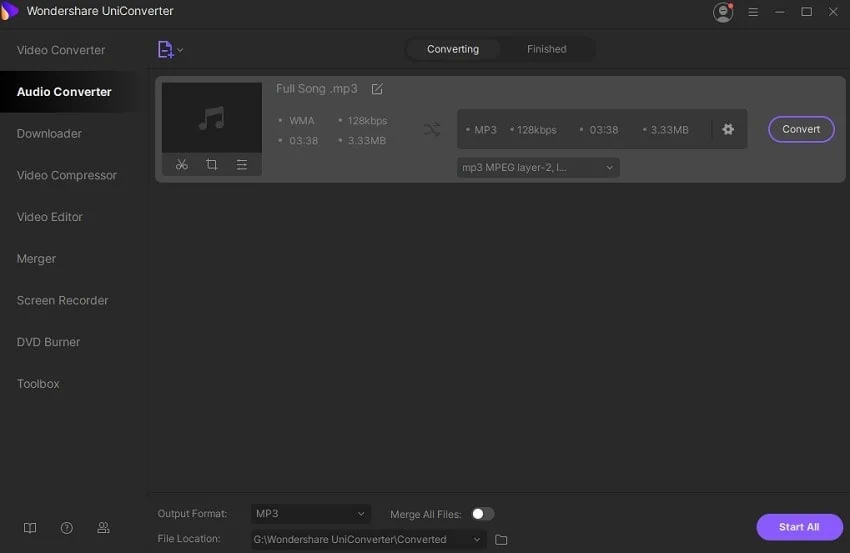
Step 1. Run the UniConverter and Add the WMA File:
Launch the software on your system and click on the Audio Converter section. Press Add to upload the WMA audio file.
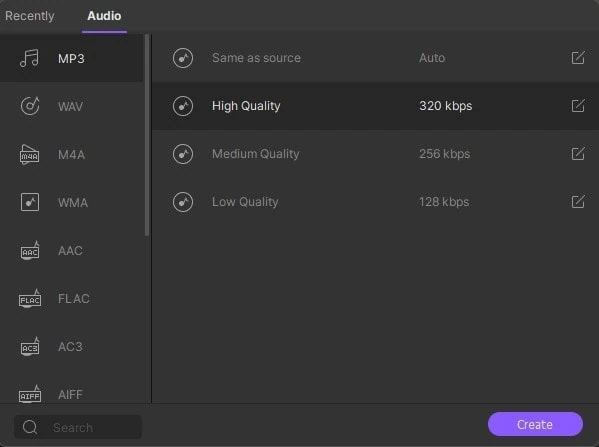
Step 2. Manage the Settings:
Hit the Settings button right next to the added file. Under the Audio section, select MP3 and click on Create. Moreover, pick the folder where you want to store the MP3 data.
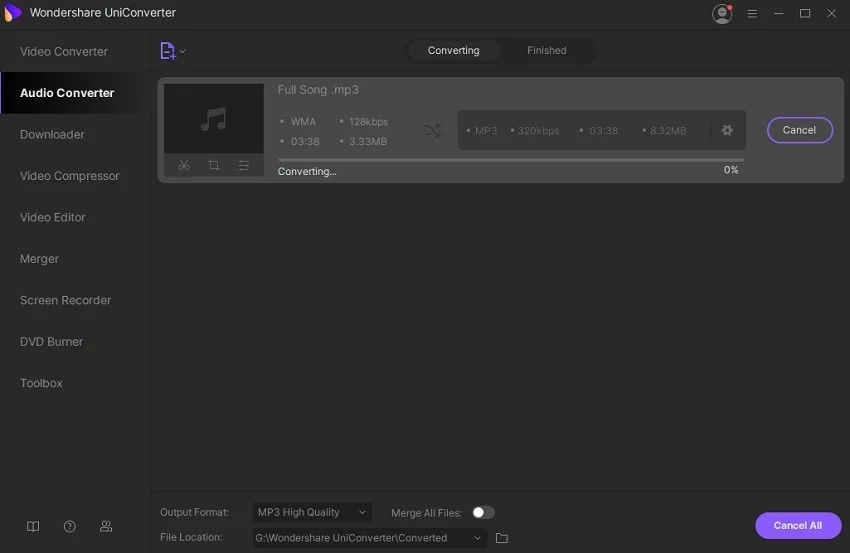
Step 3. Start Audio Conversion from WMA to MP3:
Hit Convert for the process to begin, which will merely take a minute to finish.
Audio Converter – Convert WMA to MP3 Online:
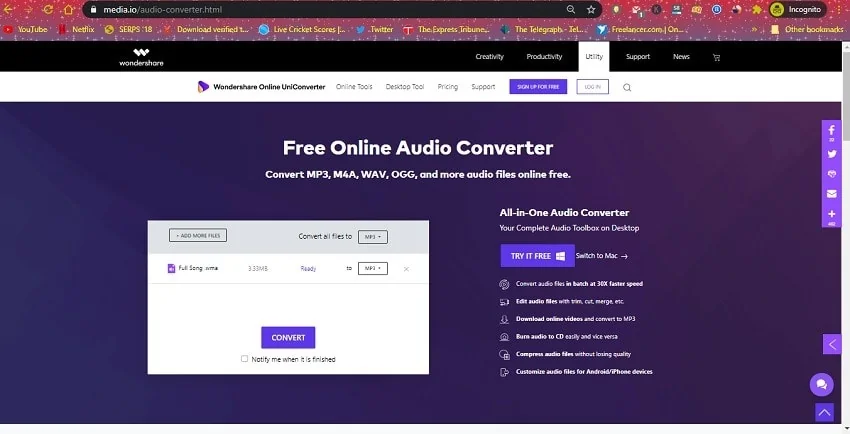
If you are not eager to add the UniConverter on your system due to whatever reasons, then you can use the Online UniConverter. The online platform offers close to 90% the same feature of the original version. It is fast and intuitive for the standard user. You can compress MP4 videos, edit files, and convert images. The instructions to use the Online UniConverter are listed below:
- Launch your Web browser and access the following URL: https://www.media.io/
- Click on the Audio Converter tab from the webpage;
- Add the WMA audio file to the platform and click on Convert;
- Press Download to store the newly converted file on your computer, once the platform converts WMA to MP3.
Conclusion:
There is no complexity while converting an audio file with the WMA extension to MP3. However, things will become much easier if you use a reliable file conversion tool. It is why we suggest the full version of the latest UniConverter.
In this tutorial, we have discussed the three unique methods to convert WMA to MP3. After that, you will be able to perform the procedure on your own. You can share this guide among family and friends, especially if they are finding any difficulty converting the format of their multimedia files.